

Alright folks, this is your one-stop guide for all download and runtime issues. I've reorganized everything with a navigation menu below—just click on your problem and save yourself the scroll.
【Quick Navigation】
📦 Extraction Issues | 🎮 Game Launch Problems | 🗡️ RPG Games Special | 📁 Special File Handling | 🔧 Tools Download
📦 Extraction Issues (Where Most Problems Happen)
1. Can't Find the Password
Check your download folder for a file named "password.rtf". Each archive has its own rtf file—make sure you're using the one that came with your specific download.
2. Can't Open the RTF File
Android users grab WPS Office. PC users need Word or OfficeSuite—don't try to wing it with Notepad.
3. Wrong Password Error Even When Correct
Either I messed up, or you missed/extra characters when copying. Double-check carefully—no need to roast me yet.
4. Password Error Mid-Extraction
Unstable connection corrupted the file. Redownload from scratch—no resume, fresh start only.
5. Can't Find Downloaded Files
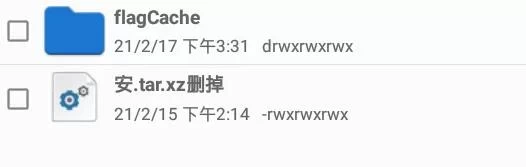
Open Baidu Netdisk → Transfer List → Check file path. Follow the folder structure step by step. Still lost? See the image:
6. ZArchiver Keeps Saying Wrong Password on Android
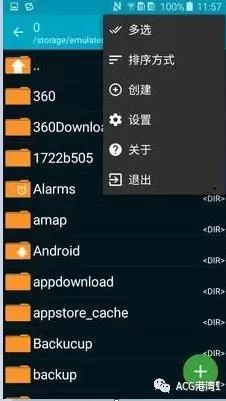
You downloaded a fake ZArchiver. The legit version has a black background; fake ones are white. Here's what the real one looks like:
7. Files with ".7zdelete" in Name
Anti-link-death measure from Baidu. Just manually remove "delete". Steps: Long press file → Rename → Delete the Chinese characters from "filename.7zdelete" to make it "filename.7z". Same for .tar.xzdelete.

🎮 Game Launch Problems
1. Green Bar + Gibberish Text on Launch
Locale issue. Google "Locale Emulator tutorial"—two steps and restart. Or switch to full English path: change "D:baidu/1/File /游戏/URE ONYX" to "D:baidu/1/wén jiàn/URE ONYX" (replace Chinese folder names with pinyin).
2. Android Game Won't Open
Check my article intro—if it says "Android+PC", you're good. Non-.apk files need KiriKiri Simulator to run data.xp3. Apple users can try too, haven't tested but method should be similar.
3. PC Game Won't Launch (Unity Games)
Check filename for 64 or 32—that matches your OS architecture. 32-bit systems might not run 64-bit programs, though most of the time it's fine.
🗡️ RPG Games Special
1. RPG Maker Game Missing Three Essentials
Android .apk installs ignore this. PC players will get errors without all three installed—links at the bottom.
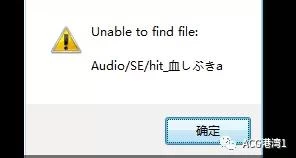
2. RPG Game Missing File Errors
Your antivirus or firewall deleted them. Find similar files in the same folder, copy one and rename it to the missing filename.
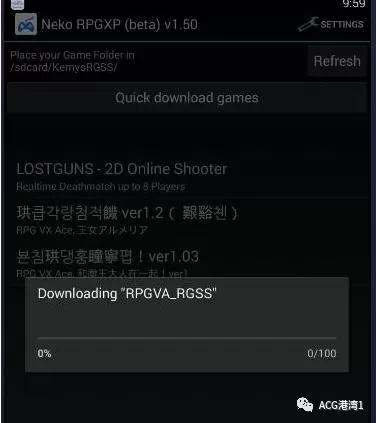
3. Playing RPG Games on Android (No .apk)
Install Neko RPG—tutorial below. Needs both RPGVX and RPGVA files, software links at the bottom.
📁 Special File Handling
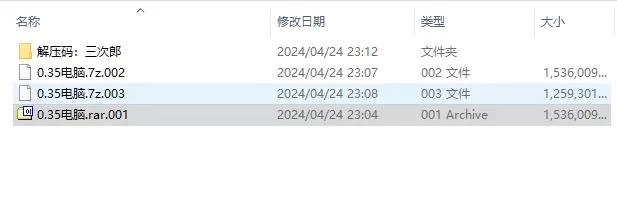
1. .001/.002 Split Archives
Must download ALL parts before extracting—missing one breaks everything. Rename to .7z.001 format, then extract with 7-Zip.
2. .tif Extension Files
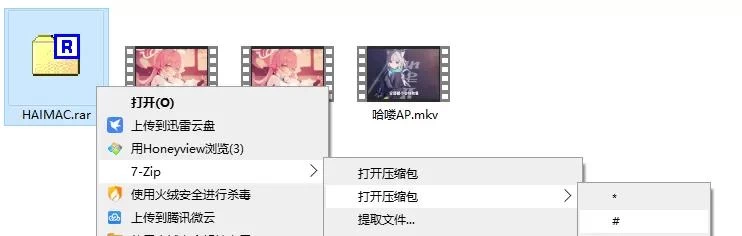
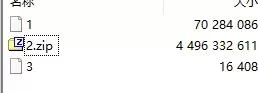
Rename to .tar then extract. Files over 2GB must be opened with 7-Zip's # method to extract inner file 2.
3. Running FLASH Games
.apk files install directly. PC uses Xunlei Media Player to open. Android manual play software at the bottom.

🔧 Tools Download
Extraction Software: 7-Zip for PC, ZArchiver for mobile (genuine=black background, fake=white background)
RPG Three Essentials, Neko RPG, RPGVX/VA files, Flash Player, WPS for reading passwords—I've bundled all tools at the end of this article. Grab them yourself.
Changing extensions prevents Baidu link death—annoying but works, blocks 80% of crack attempts. Under 2GB just rename extension, over 2GB follow the tutorial above.
Drop your questions in the comments—I reply fast and will make sure you get everything running smoothly.

Publish Comments